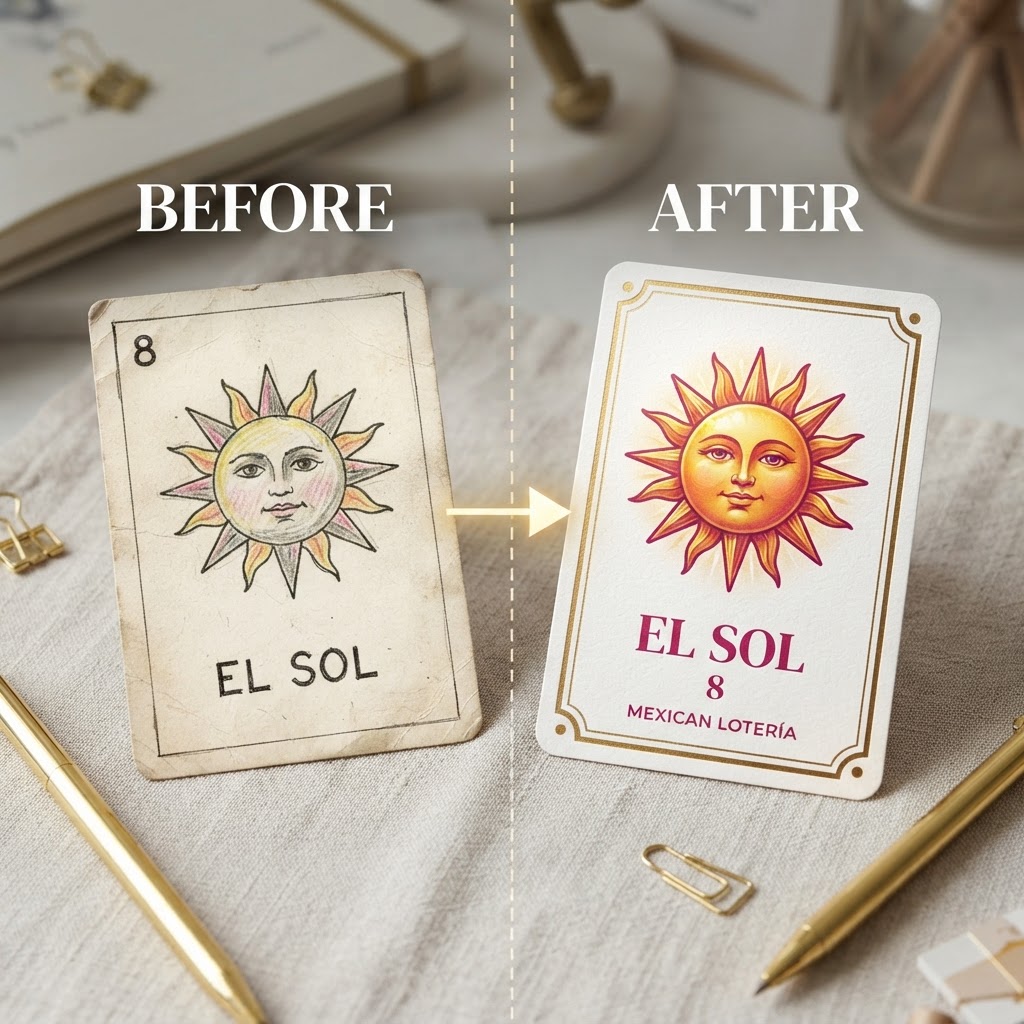
The Anatomy of a Great Lotería Card
Before diving into specific techniques, it helps to understand what separates a polished lotería card from a home-printed afterthought. Every strong card shares the same structural DNA: a clearly readable image that fills most of the card face, a short name label at the bottom, and a card number badge that ties the entire deck together visually. Get those three elements working in harmony and you're already ahead of most DIY decks out there.
Traditional lotería cards follow a roughly 2:3 portrait ratio — tall enough to showcase the illustration, compact enough to fit comfortably in a player's hand. The image area should occupy approximately 75–80% of the card face, leaving room for the title strip below and a small badge in the corner. Crowd the image or shrink the label into illegibility and the card starts feeling amateurish, even if the artwork is excellent. Respect the proportions and the card does most of the work for you.
The tips below build on that foundation. Whether you're creating a family reunion keepsake, a themed party game, or a wedding favor deck, these seven principles will help your custom cards look like they belong in a retail box — not a laser-printer tray.
Tip 1 — Choose High-Quality Source Photos
The single biggest factor in how your finished card looks is the quality of the image you feed into the process. AI cartoonification is remarkably good at interpreting photographs, but it cannot invent detail that isn't there. A blurry, low-resolution snapshot will produce a muddy illustration with soft edges and lost texture. A sharp, well-lit photo will produce a crisp, expressive cartoon with clean linework.
Aim for photos that are at least 1000 × 1000 pixels and shot in decent natural light or even indoor lighting with minimal harsh shadows. The subject should fill most of the frame — if you're cartoonifying a pet, don't use a photo where the animal is a tiny figure in a wide landscape shot. Crop tightly before uploading so the AI focuses on what matters.
Composition also plays a role. Straight-on or three-quarter angle shots tend to cartoonify more cleanly than extreme close-ups or unusual angles. Solid or simple backgrounds prevent the AI from competing elements for visual attention, and they make the subject pop once the illustration is dropped onto your card template. A few minutes of photo selection upfront saves a lot of frustration later.
Tip 2 — Match Colors to a Theme Palette
A deck of lotería cards is a system, not a collection of individual cards. That distinction matters enormously when it comes to color. If every card uses different accent colors, background hues, and border tones, the deck reads as chaotic when spread across a table — exactly the opposite of the visual impact you're going for.
The most effective approach is to choose a single theme palette and apply it consistently across every card in the deck. That means matching border colors, title strip backgrounds, badge fills, and any background patterns or solid fills you use. When all 54 cards share the same color language, the deck feels intentional and professionally produced.
Modern Lotería Studio's Deck Editor includes twelve theme presets — from classic warm terracotta and gold to modern pastels and bold high-contrast palettes — that apply a coordinated color scheme across your entire deck in one click. If you want to build a custom palette, use that starting point as a reference: match your border color to a darker shade of your background, and keep the title strip in a high-contrast neutral so text stays readable regardless of the image behind it.
One practical rule: limit yourself to three to four colors per deck. More than that and cohesion starts to break down. Less than three and the cards can feel flat. That sweet spot gives you enough visual variety within each card while keeping the full deck unified.
Tip 3 — Keep Titles Short and Readable
Lotería card titles are called out loud during play. They're also read quickly by players scanning their tablas. That means legibility isn't optional — it's the whole job of the title strip. Yet it's one of the most commonly neglected elements in custom deck design.
Keep card names to one to three words maximum. "La Abuela Rosa" works. "La Abuela Rosa Celebrating Her Birthday in the Garden" does not. If you need to describe the card more fully, use the card number badge as a reference and keep the storytelling for a deck insert or back-of-card text. The front label has one job: tell a player what card was drawn, fast.
Font size should be large enough to read at arm's length — generally 10pt or larger at final print size. Avoid decorative or script fonts for the title strip; they look beautiful in isolation but become difficult to parse quickly, especially for players who aren't fluent in the language the deck is written in. A clean sans-serif or bold serif is almost always the right call. All-caps titles work well for short names; mixed case becomes more readable for anything over two words.
Tip 4 — Use Consistent Art Styles
Mixing art styles within a single deck is one of the fastest ways to make it look unfinished. If some cards feature soft watercolor-style cartoons while others have hard-edged vector illustrations and others use barely-filtered photos, the deck loses its visual identity. Players notice inconsistency even when they can't name exactly what feels off.
The good news is that when every image passes through the same AI cartoonification process — as they do in Modern Lotería Studio — you get a built-in stylistic baseline. The algorithm applies consistent linework, saturation, and abstraction level across all your uploads, which means a photo of your grandmother and a photo of your family dog will end up feeling like illustrations from the same artist.
Where inconsistency sneaks in is when designers mix AI-generated cartoons with clip art, stock illustrations, or photos they decided not to cartoonify. Pick one lane and stay in it. If you want a fully illustrated deck, run every image through the cartoonifier. If you prefer a photo-forward look, keep all cards as photographs. Blending the two creates a visual mismatch that no amount of matching borders will fully resolve.
Tip 5 — Mind the Print Margins
Digital design and physical printing have a fundamental tension: what looks perfect on screen often gets clipped, shifted, or color-shifted when it hits paper. Understanding print margins — specifically bleed areas and safe zones — is what separates a deck that prints cleanly from one that comes back from the printer with cut-off titles and missing border edges.
Bleed refers to the extra image area that extends beyond the final trim line, ensuring that background colors or patterns fill the card edge-to-edge even if the cutter shifts slightly. A standard bleed is 1/8 inch (3mm) on all sides. Safe zone refers to the inner boundary where all critical content — titles, badges, important parts of the illustration — should live. Keep everything important at least 1/8 inch inside the trim line.
When using background patterns in Modern Lotería Studio, make sure the pattern extends to the bleed edge rather than stopping at the card boundary. Solid color backgrounds are more forgiving, but patterned backgrounds make bleed gaps obvious if they're not set up correctly. When in doubt, export a single test card as a PDF and check the dimensions before generating your full deck.
Tip 6 — Balance Visual Weight Across the Grid
Tablas — the playing boards each participant uses to mark off called cards — are often treated as an afterthought. They shouldn't be. A well-designed tabla is part of the game experience, and a poorly balanced one can actually make the game harder to play, not just uglier to look at.
Visual weight refers to how visually "heavy" or "light" each card feels in the 4×4 grid. Cards with very dark illustrations next to cards with very light ones create a patchy, uneven look. Ideally, you want a mix of light and dark images distributed across the tabla so no single quadrant feels visually dominant.
Modern Lotería Studio's tabla generator handles card placement automatically, but you can refine the visual balance by reviewing the generated tablas before export. If several consecutive dark cards cluster together, consider adjusting your image brightness settings in the Deck Editor or reordering card numbers to distribute contrast more evenly. Small adjustments here have a big impact on how polished the final playing boards look in use.
Tip 7 — Test Before You Print
No matter how good your design looks at 100% zoom on a high-resolution monitor, always run a test before committing to a full print run. Screens and printers interpret color differently. What looks like a vibrant coral on screen may print as dull salmon. What appears as a clean white background on your monitor may emerge as slightly warm cream on coated paper.
The most reliable test is printing a single sheet on your target printer — whether that's a home inkjet, a local print shop's laser printer, or an online print-on-demand service. Check that titles are legible, borders aren't getting clipped, and the color feel matches your expectations. Adjust brightness or saturation in the theme settings if needed.
Use Modern Lotería Studio's built-in PDF preview to verify card dimensions, check that all text elements are rendering correctly, and confirm that background patterns are extending to the correct boundaries. The preview is also a good moment to catch any cards where the AI cartoonification produced an unexpected result — better to catch a muddy illustration in preview than after a hundred tablas have been printed.
Bringing It All Together
Great lotería card design isn't mysterious — it's systematic. Start with sharp source photos and let AI cartoonification establish a consistent visual style. Choose one theme palette and apply it without exception across every card in the deck. Keep titles short, badges clear, and borders properly set up for print. Balance the visual weight of your tablas before export, and always test a single print before the full run.
Each of these tips addresses a specific failure point that separates decks that look genuinely professional from those that look like a craft project. Follow all seven and the cumulative effect is significant: a deck that feels cohesive, intentional, and worthy of the occasion — whether that's a quinceañera, a family reunion, or simply a Friday game night elevated by something personal.
Ready to put these principles into practice? Open the Deck Editor to start building your custom deck with AI cartoonification, theme presets, and print-ready PDF export built in. Not sure which plan fits your project? Review the pricing options to find the right fit before you start designing.
The best custom lotería deck you'll ever play with is the one you made yourself — and now you have the tools to make it look like someone else made it professionally.


