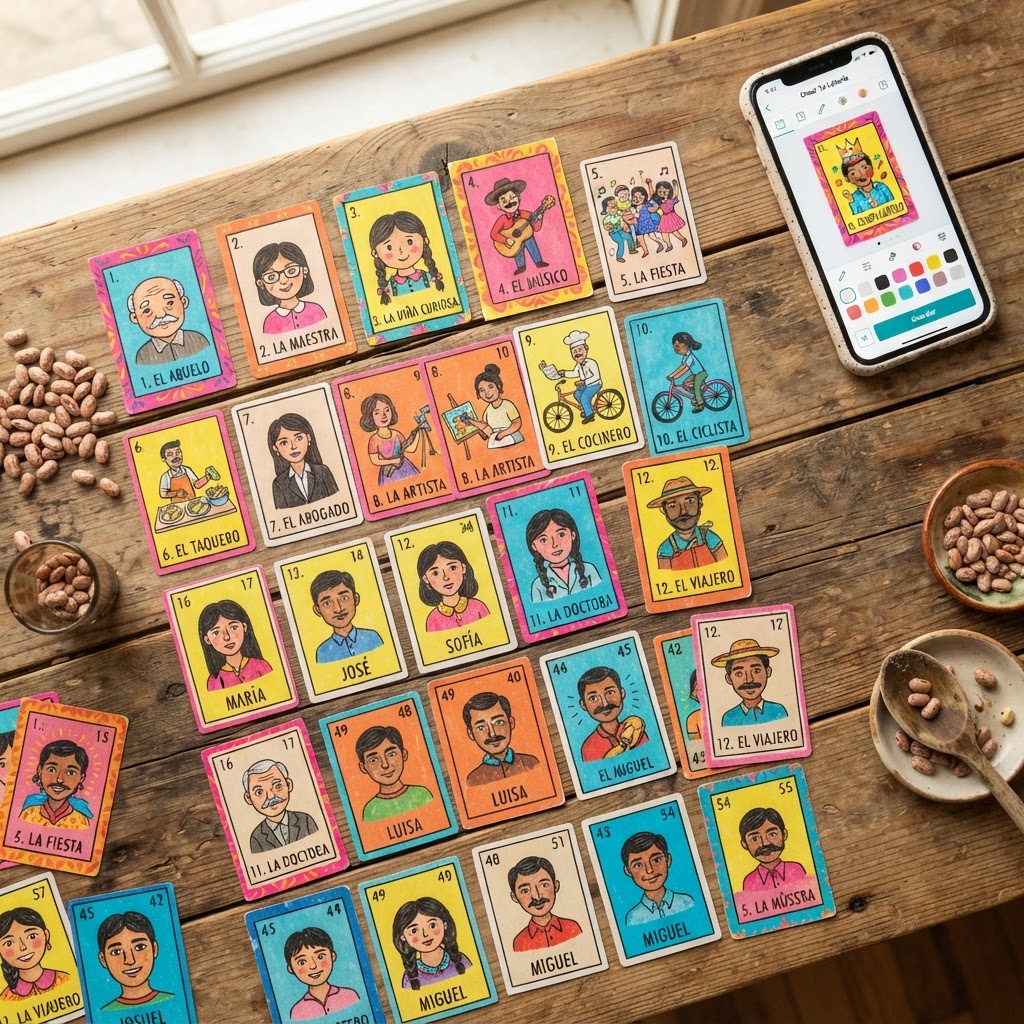
Why Make Your Own Lotería Cards?
Lotería has been bringing families and friends together for centuries. Rooted in Mexican tradition and first popularized in the 18th century, this beloved game of chance combines the thrill of bingo with the richness of illustrated iconography — El Sol, La Sirena, El Gallo — each card a small work of art that carries cultural meaning. But what if the characters in your game were your own family members, your pets, your inside jokes, or the milestones that define your story?
That is exactly why custom Lotería sets have exploded in popularity. Whether you are planning a quinceañera, a wedding reception, a birthday party, or a family reunion, a personalized deck transforms a classic game into an unforgettable keepsake. Guests do not just play — they laugh, they reminisce, and they take home something they will treasure for years.
Beyond celebrations, custom sets serve real practical purposes. Teachers create classroom-themed decks for vocabulary practice. Small businesses produce branded sets as promotional merchandise. Non-profits use personalized Lotería to celebrate community heroes. The creative possibilities are genuinely limitless, and the barrier to entry has never been lower — especially when you use the right loteria card maker.
What Is a Lotería Card Maker?
A lotería card maker is a digital tool that allows you to design, customize, and export your own Lotería deck without needing graphic design experience or professional software. At its core, any good lotería card maker should handle the three essential components of the game: the individual illustrated cards (each representing a unique image and title), the tablas (the 4x4 game boards each player holds), and the final print-ready output so your creation can move from screen to table.
The category ranges from basic template editors — where you drop an image into a pre-sized frame — all the way to AI-powered platforms that automatically transform ordinary photographs into stylized, hand-drawn-looking illustrations in the authentic Lotería aesthetic. The difference in quality between these approaches is significant, and it matters enormously when your finished deck needs to look polished rather than patched together.
Modern Lotería Studio sits at the advanced end of that spectrum. Rather than simply resizing a snapshot into a card frame, the platform uses artificial intelligence to cartoonify your uploaded photos into genuine Lotería-style artwork — bold lines, vivid colors, and expressive character rendering that honors the visual language of the original game. If you want a deck that looks like it belongs in the tradition rather than a scrapbook, that distinction is everything.
How to Create Custom Lotería Cards: Step-by-Step
Ready to build your own deck? The following walkthrough covers the entire process inside Modern Lotería Studio, from your first photo upload to a print-ready PDF. The whole workflow takes most users under 30 minutes.
Step 1 — Start a New Deck in the Editor
Head to the Deck Editor and click Create New Deck. You will be prompted to give your deck a name — something like "García Family Reunion 2025" or "Mia's Quince" works perfectly. This name appears on your exported files and helps you stay organized if you create multiple projects. You can set the total number of cards at this stage, or add and remove cards freely as you work.
Step 2 — Upload Your Photos
Click Add Card and select your first photo from your device. The uploader accepts JPEG, PNG, and WEBP files. For the best AI results, use photos where your subject is clearly visible, well-lit, and reasonably centered in the frame. Group shots work beautifully for family cards. Close-up portraits produce especially expressive cartoon results. You can upload multiple photos in one batch to speed up the process.
Step 3 — Let AI Generate the Illustration
Once your photo uploads, hit Cartoonify. The AI engine analyzes your image and renders it in a Lotería-inspired illustration style — think bold outlines, slightly exaggerated features, and the warm, graphic quality you associate with classic Mexican folk art cards. Processing typically takes 15 to 30 seconds per card. You will see a before-and-after preview so you can approve the result before moving forward.
Step 4 — Add Your Title, Number, and Colors
Every traditional Lotería card has a title — La Muerte, El Borracho, La Rosa — and a card number. In the editor, type your custom title into the title field beneath the illustration. Keep titles short and punchy: "El Abuelo," "La Reina del Baile," or even a nickname works wonderfully. Assign a card number from the sidebar, then use the color palette tools to customize the border, background band, and title text to match your theme or event colors.
Step 5 — Build Your Tablas
No Lotería game is complete without the tablas — the 4x4 bingo-style boards each player uses during the game. Once you have created at least 16 cards, navigate to the Tablas Generator tab. The platform automatically arranges your cards into randomized 4x4 grids, ensuring no two boards are identical. You can generate as many tablas as you need for your group. Each tabla is automatically formatted for print.
Step 6 — Export Your Print-Ready PDF
When your deck and tablas are finalized, click Export PDF. The file downloads with all card pages and tabla pages formatted at 300 DPI — professional print resolution. Standard card dimensions follow traditional Lotería sizing so your deck feels authentic in hand. Your PDF is ready to send to a local print shop or home printer immediately.
How AI Cartoonification Transforms Your Photos
The single most meaningful advantage of using Modern Lotería Studio over a generic design tool is the AI cartoonification engine. This is not a simple filter or a color-saturation adjustment. The technology performs genuine style transfer, re-rendering facial features, clothing, and backgrounds through the visual logic of hand-illustrated folk art.
In practice, this means a photograph of your grandmother at the kitchen table becomes La Abuela — her warmth and personality intact, but rendered with the bold outlines and expressive simplicity of a classic Lotería illustration. A snapshot of your dog transforms into El Perro with comic charm. The AI preserves likeness while adding the stylization that makes the card feel like it belongs in the deck rather than being pasted onto it.
This matters for two reasons. First, aesthetically: a deck where every card is clearly illustrated in a unified style looks professional and intentional. Second, emotionally: the cartoonification process gives your subjects a kind of iconic quality — they become characters in their own mythology, which is precisely what the greatest Lotería decks have always done. For a deeper look at how the engine works, explore our Deck Editor and try the cartoonify feature on a test photo before committing credits.
Design Tips for Professional-Looking Cards
Even the best AI tool benefits from a few deliberate design choices on your part. These tips will help your custom Lotería set look polished from the first card to the last.
- Shoot photos with clean backgrounds. The AI isolates your subject more cleanly when there is minimal background clutter. A plain wall, outdoor greenery, or a simple tablecloth works far better than a busy room.
- Keep your color palette consistent. Choose two or three accent colors that run through every card's border and title band. This cohesion is what separates a themed deck from a random collection of images.
- Write titles in Spanish for authenticity. Even if your audience speaks primarily English, Spanish titles honor the cultural tradition and simply look more elegant on the card. El Campeón lands differently than "The Champion."
- Balance card numbers intentionally. Traditional Lotería decks number 1 through 54. If you are making your own loteria set with 20 or 30 cards, consider numbering them in a way that tells a story — chronological life events, family hierarchy, or thematic groupings.
- Use the preview before exporting. Always review the full-deck preview before downloading your PDF. Check that titles are not truncated, that colors render as expected, and that the tabla grids feel balanced.
- Design tablas to match card styling. Apply the same border color and font family to your tablas as you used on the cards. Visual consistency makes the final product feel like a unified game set, not two separate projects.
From Screen to Table: Printing Your Custom Set
Your exported PDF is formatted at 300 DPI and ready for professional printing. Here are the best options for bringing your custom loteria set into the physical world.
Home printing works well for small groups and playtests. Print on cardstock (at least 80 lb / 216 gsm) rather than standard copy paper — the extra weight gives cards the feel and durability they need. After printing, use a paper cutter rather than scissors for clean, consistent edges.
Local print shops (Fedex Office, Staples, local copy centers) can handle larger runs affordably. Upload your PDF directly to their online portals or bring it on a USB drive. Request cardstock printing and ask about lamination if you want the cards to survive repeated use. Expect turnaround of one to two business days for most orders.
Online print-on-demand services like Printful or Canva Print offer premium card printing with rounded corners and professional finishes. These are the best choice if you are producing a high-quality keepsake set or selling branded decks through your own channels.
For tablas, standard 8.5x11 cardstock prints two tablas per page at full size. Print enough so every player has one, plus a few extras — tablas get lost, spilled on, and enthusiastically folded by children.
If you would rather skip the design process entirely and start with a beautifully illustrated foundation, browse our pre-made sets in the Store — ready to download, customize lightly, and print straight away.
Frequently Asked Questions
Is a loteria card maker free to use?
Modern Lotería Studio offers a free tier that lets you explore the editor, upload photos, and preview cartoonified results. Exporting full print-ready PDF decks uses credits, which are available in flexible packages. Visit our Pricing page to see current credit plans — most complete decks cost less than a store-bought game.
How many cards do I need to make a complete Lotería set?
Traditional Lotería decks contain 54 unique cards. However, many custom sets work beautifully with fewer — 20 to 30 cards is a practical range for events and parties. The tablas generator accommodates any deck size of 16 cards or more, since each 4x4 tabla requires exactly 16 card slots.
Can I make my own Lotería cards without design experience?
Absolutely. The entire workflow in Modern Lotería Studio is designed for non-designers. The AI handles illustration, the editor provides pre-formatted card templates, and the PDF export takes care of print sizing. If you can upload a photo and type a title, you have all the skills you need.
What file format do the printable Lotería cards export in?
All exports are PDF files formatted at 300 DPI — the industry standard for professional printing. Each PDF includes all card pages and, if generated, all tabla pages in a single organized document.
Can I use this loteria generator for commercial purposes?
Yes. Decks created with Modern Lotería Studio using your own uploaded photos are yours to use commercially. If you use any pre-made assets from our Store, review the individual asset license on the product page. Full commercial licensing details are outlined in our Terms of Service.
How is Modern Lotería Studio different from Canva for making Lotería cards?
Canva is a powerful general design tool, but it treats Lotería cards as a blank template you fill manually. Modern Lotería Studio is purpose-built for Lotería — the AI cartoonification engine, the automatic tablas generator, the traditional card formatting, and the print-ready PDF export are all native features. The result is a finished deck that looks authentically illustrated rather than digitally assembled.
Your family's story deserves its own iconic cards. Whether you are celebrating a milestone, preserving a memory, or simply looking for a game night upgrade, making your own Lotería set has never been more accessible — or more rewarding. Open the Deck Editor right now, upload your first photo, and see your people transformed into the legends they have always been. Your custom deck is minutes away.


